

Accounts, roles, and sessions
Controller accounts are local to oonfeeWRT. They are separate from router logins and from the runtime passphrase that unlocks keyring.json at startup.
Outcome: Each person has an individual account with the least role needed, and owners can review or revoke active sessions without sharing credentials.
Find account controls
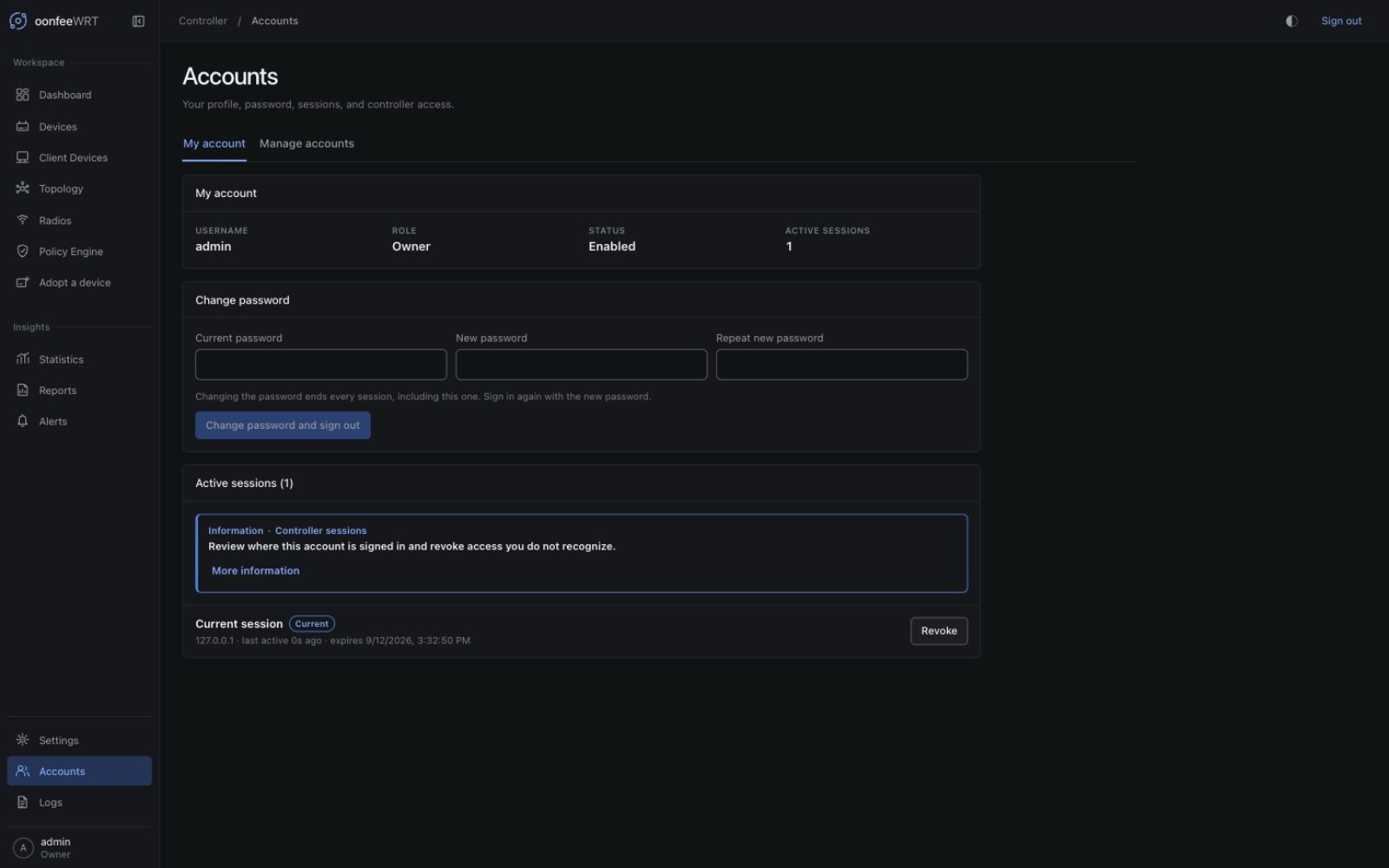
v0.1.8 keeps the dedicated Accounts workspace introduced in v0.1.6 at /accounts. It sits between Settings and Logs in the bottom Controller sidebar group. Opening it shows My account for every signed-in role; only owners also see Manage accounts.
The compact profile below Logs is a second shortcut to Accounts. It shows the signed-in username and role when the sidebar is expanded, and an initial when collapsed; its accessible name still identifies the account and role. It does not switch users or create an additional session. On mobile, open the navigation drawer to reach this profile.
The procedures below use v0.1.8 navigation. Older v0.1.5 keeps the same account controls inside Settings:
| Task | v0.1.6–v0.1.8 | v0.1.5 |
|---|---|---|
| Own identity, password, and sessions | Accounts → My account | Settings → My account |
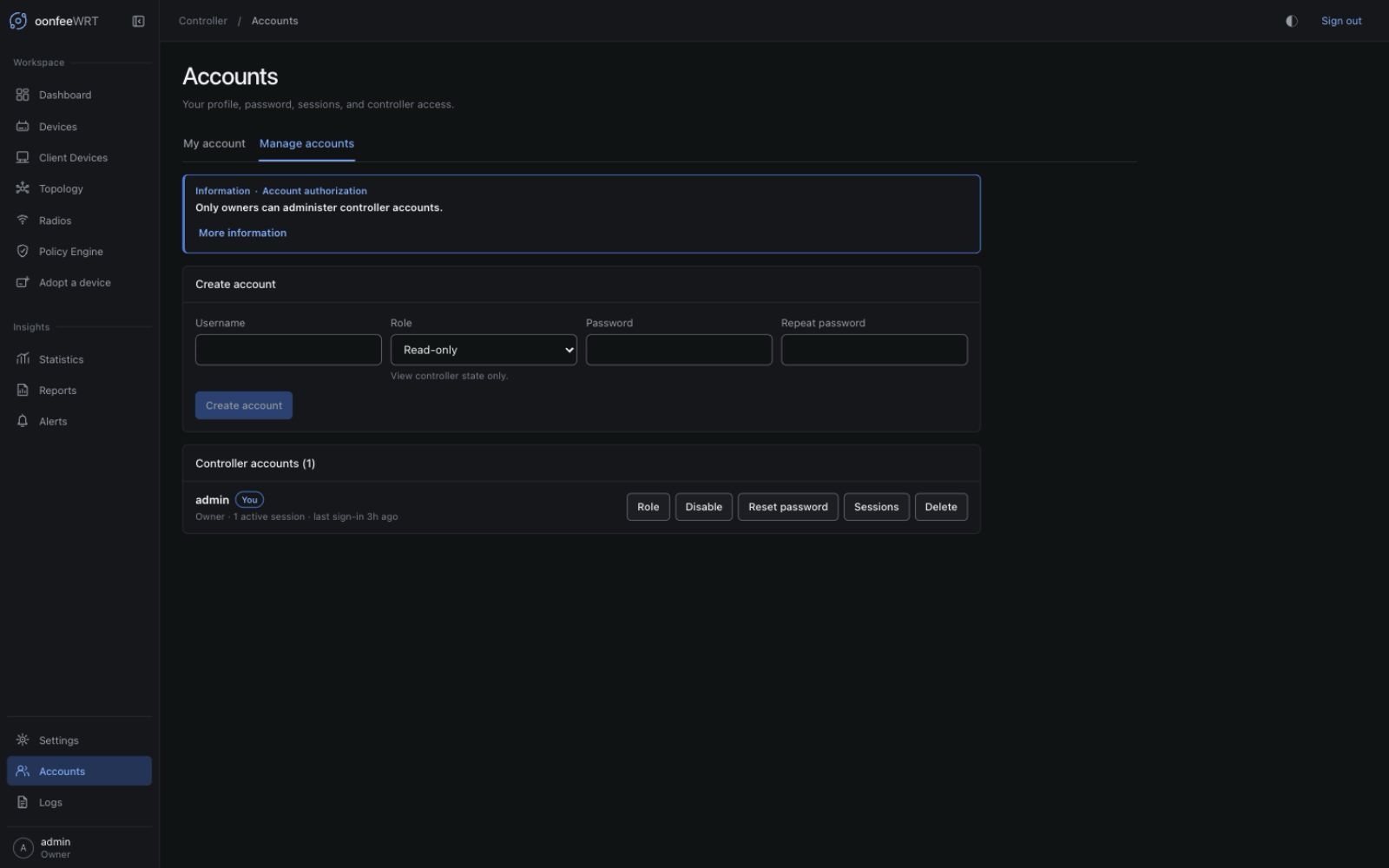
| Create or manage other accounts and sessions | Accounts → Manage accounts | Settings → Accounts |
These navigation refinements do not change permissions or account data. In v0.1.8, Settings contains Network, Firmware, Integrations, Diagnostics for administrators/owners, and Backup & Restore for owners. Firmware and Integrations were standalone workspaces in v0.1.6. A direct link to an unauthorized Settings section returns to Network; it does not grant access or leave the browser's Back button in a redirect loop.
Prerequisites and impact
- The first owner account must already exist.
- Only an owner can create, change, disable, delete, or reset another controller account.
- Sensitive owner actions require the owner's current password again when the last password confirmation is more than five minutes old.
Write impact: Account and session administration changes the controller database and audit log only. It does not contact or change a router. The assigned role controls what that person may later ask the controller to do.
Role matrix
Roles are hierarchical: each higher role includes the lower role's permissions.
| Role | Intended use | Important permissions |
|---|---|---|
Read-only (viewer internally) | Read-only monitoring | Read dashboards, devices, clients, topology, radios, policy/site state, General events, and own account/sessions. May request focused polling while viewing a device. |
| Operator | Day-to-day transient operations | Read-only access plus acknowledged RF scans, on-air verification, and controller-host speed-test start/cancel. |
| Administrator | Device and network management | Operator access plus discovery/inspection, management-mode selection, adoption/un-adoption, ACL refresh, optional LLDP for managed devices, reprobe, desired-state and named-policy-set editing, Preview/Apply, policy and client intent, polling settings, and diagnostics bundles. |
| Owner | Controller custody | Administrator access plus controller-account administration and encrypted backup/restore, including the post-restore write gate. |
Audit events are more sensitive than ordinary General events. The API applies additional authorization after it knows an event's scope.
In v0.1.8, every signed-in role can read Statistics, Reports, Alerts, firmware inventory, and saved integration metadata. Administrator or Owner is required to run firmware-catalogue, AdGuard, or WireGuard checks. Only the Owner edits alert rules/delivery or saves/removes AdGuard credentials; the latter connection changes also require recent password confirmation. See the permission matrix.
Browser appearance preferences are not account privileges. Topology layout and navigation expansion are scoped to the account in that browser; resetting a layout does not change another user's drawing, permissions, or router state.
Account rules
Usernames
A username must:
- contain 1–64 ASCII characters;
- start with a letter or digit;
- use only letters, digits,
.,_, or-.
Usernames are ASCII case-insensitive for uniqueness. A soft-deleted username remains reserved and cannot be recreated under different capitalization.
Passwords
- Minimum: 12 Unicode characters.
- Maximum encoded input: 1024 bytes.
- Passwords are stored as Argon2id verifiers, not plaintext.
- Account passwords are not router passwords and are not the controller runtime passphrase.
Use a unique password for each person. Do not create one shared “admin” account when individual accountability matters.
Create an account
- Sign in as an owner.
- Open Accounts → Manage accounts.
- In Create account, enter the username.
- Choose Read-only, Operator, Administrator, or Owner. New accounts default to Read-only. The description below the role selector updates with the selection; compare it with the role matrix before granting more access.
- Enter and repeat a password of at least 12 characters.
- Select Create account.
- If prompted, enter your current owner password to establish a new five-minute reauthentication window, then run the pending action.
The account mutation and its audit event are committed together. If the mutation fails, it is not presented as an audited success.
Verify a new account
Use a separate private browser window so you do not disturb the owner session:
- Sign in as the new user.
- Expand the sidebar, or open its mobile drawer, and confirm the bottom profile shows the correct username and role.
- Open Accounts → My account and verify the role.
- Confirm the navigation and controls match the role matrix. A forbidden API operation remains forbidden even if stale UI state displayed a control.
- Sign out of the test window.
Change an account's role
- Open Accounts → Manage accounts as an owner.
- Find the account and select Role.
- Choose the new role.
- Review the privilege change, reauthenticate if requested, and confirm.
Role-bearing sessions are checked by the API. Do not rely solely on hiding controls in the browser.
The last enabled owner cannot be demoted. Create and verify another owner first if ownership must move.
Disable or enable an account
Disabling preserves the account and audit identity while preventing authentication.
- Open Accounts → Manage accounts.
- Select Disable or Enable beside the account.
- Review and confirm after any required reauthentication.
The last enabled owner cannot be disabled. Disabled and deleted accounts deliberately authenticate like an unknown username so the login response does not reveal account existence.
Reset another account's password
- Open Accounts → Manage accounts.
- Select Reset password for the account.
- Enter and repeat the new password.
- Reauthenticate as the owner if requested.
- Confirm the reset.
- Give the password to the user through a protected channel and have them change it after sign-in when appropriate.
Password changes revoke that account's sessions so an old session cannot outlive the credential reset.
Change your own password
- Open Accounts → My account.
- Enter the current password.
- Enter and repeat the new password.
- Select Change password.
All of your sessions, including the current one, are revoked. Sign in again with the new password. This is intentional: a password change that leaves an existing borrowed session active would not fully remove access.
Review and revoke sessions
Sessions live only in controller memory; they do not survive a daemon restart.
Current limits:
- idle expiry: 12 hours;
- absolute expiry: 7 days;
- password reauthentication window: 5 minutes.
Your own sessions
- Open Accounts → My account.
- Review peer address, creation, last use, expiry, and the current-session marker.
- Select Revoke for an unfamiliar or no-longer-needed session.
- Confirm. Revoking the current session signs this browser out.
Another user's sessions
- Open Accounts → Manage accounts as an owner.
- Select Sessions for the account.
- Revoke one session or all sessions.
- Reauthenticate and confirm when requested.
Session revocation cancels requests associated with that session, including its live WebSocket.
Delete an account
Deletion is soft: it disables the row, removes its password verifier, retains its username for audit identity, and prevents reuse.
- Open Accounts → Manage accounts.
- Select Delete.
- Review the username carefully.
- Reauthenticate and confirm.
The last enabled owner cannot be deleted.
Authentication protections
- Session cookie:
HttpOnly,SameSite=Strict, andSecurewhen the request is HTTPS or the trusted proxy reportsX-Forwarded-Proto: https. - CSRF: mutating authenticated requests require the matching
X-Oonfee-CSRFtoken. - Setup and login: same-origin browser checks protect the unauthenticated endpoints.
- Login throttling: ten failures from one socket peer address within five minutes produce a five-minute lockout.
- Account-specific password confirmation: five failures within five minutes produce a five-minute lockout for that session.
- Unknown-user login spends the same Argon2id work as a known-user failure to reduce username timing disclosure.
The login limiter uses the socket peer, not untrusted X-Forwarded-For. When every request arrives from one reverse proxy, failed attempts share that proxy peer for throttling.
Troubleshooting and recovery
recent password confirmation is required
Complete the Confirm owner identity form with the current account password. The resulting step-up lasts five minutes for that session.
last_owner
The operation would disable, demote, or delete the final enabled owner. Create and verify a second owner, then repeat the transfer.
A username is unavailable after deletion
This is expected. Soft deletion reserves the identity so audit history cannot later refer to a different person with the same username.
A user is unexpectedly signed out
Check whether their password changed, an owner revoked their sessions, the account was disabled/deleted, the 12-hour idle or seven-day absolute lifetime elapsed, or the controller restarted.
Login is temporarily locked
Wait for the five-minute window instead of retrying continuously. Verify the correct password in your password manager before the next attempt.
No owner can sign in
Do not edit the SQLite database by hand; account, secret, schema, and audit invariants are transactional. Restore a verified controller backup containing an enabled owner, or recover through a separately tested controller recovery plan.