

Discovery, adoption, and devices
The Devices workflow moves from unknown address, to read-only inspection, to an explicit management mode and adopted functions. Discovery never equals adoption, and adoption never equals applying network configuration.
The device lifecycle
Device views retained in v0.1.8
v0.1.6 introduced illustrated Cards and List views, device search, and status filtering. Adoption, management-mode fences, and configuration approval remain unchanged.
- Discover or add an address.
- Inspect model, firmware, interfaces, functions, and source gaps without saving a management credential.
- Adopt in Managed or Monitor only mode, select Gateway, AP, or Switch functions, and approve scoped controller access.
- Observe, and configure only managed devices through the device and site views.
- Reprobe or refresh access when firmware or capabilities change.
- Un-adopt through a reviewed cleanup plan when the device leaves the controller.
Find your way around the inventory
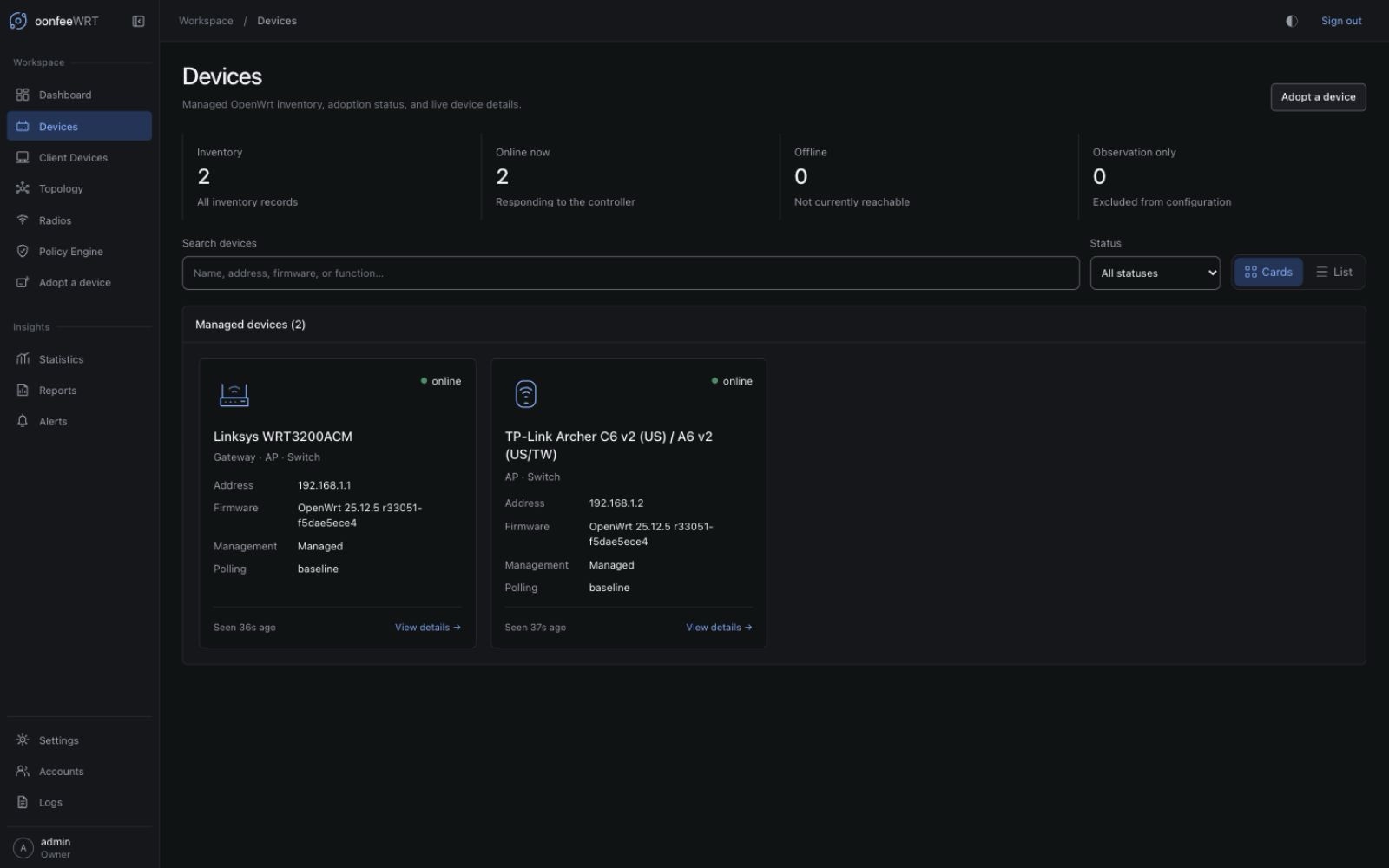
In v0.1.8, start with the fleet summary, then use Search devices to match a name, address, firmware, or adopted function. Combine it with the status selector to narrow the loaded infrastructure inventory. The summary describes the fleet; Showing … of … devices describes the current filters. An unavailable inventory is not reported as an empty fleet.
Cards emphasizes identity, status, management mode, and functions. List provides the denser column view for comparisons. The selected view is remembered in this browser when storage is available. It does not change the device or your controller permissions. Both views open the same device details.
Illustrations represent known adopted functions, not detected manufacturers or exact physical models. A combined Gateway/Switch is still one device. Use the identity and stored board/capability information in its details when exact hardware matters.
For historical comparisons open Statistics. For an explicit check against the official OpenWrt release catalogue open Firmware. A catalogue match is not installation approval; the controller does not download or flash an image.
Find a device
Open Adopt a device or use the adoption action from Devices.
Add by address
Add-by-address is the reliable path in every supported deployment. Enter the router's management hostname or IPv4 address and continue to inspection.
Use it when:
- the controller runs in Docker bridge mode;
- the router is across a routed management VLAN or VPN;
- local discovery does not cover the subnet;
- you already know the management address.
Scan the local subnet
Discovery is an explicit, on-demand IPv4 scan. The scan will not accept a network wider than /22. It probes each eligible address over TCP for an unauthenticated OpenWrt /ubus endpoint; it does not implement ARP or mDNS discovery. A bridged container may not expose the LAN subnets to this scan.
Discovery only lists candidates. It does not create a router login, change UCI, install a package, or begin continuous management.
Inspect before adoption
Provide the router administrator credential only in the inspection/adoption flow. The controller can use it to establish facts such as:
- model, board, and firmware;
- management address and device MAC;
- radio and interface evidence;
- LAN, WAN, default-route, and switch-mode evidence;
- recommended Gateway, AP, or Switch functions;
- capability features, unobservable sources, driver notes, and source gaps.
Unknown is not the same as absent. If the controller could not read a source, the inspection should say so. Fix the source or accept the limitation; do not convert the gap into a capability claim.
Export a sanitized compatibility report
After a successful inspection, select Export sanitized compatibility report to download oonfeewrt-compatibility-report.json. The versioned JSON contains bounded board, firmware, radio, port, known feature-state, and supported-function evidence. It is useful when reporting whether a new OpenWrt target is recognized correctly. Radio count means physical radios, not the number of SSIDs/BSS interfaces. The current format version is 1, and the server's compact JSON representation is capped at 64 KiB. The browser formats that bounded object for readability, so the downloaded file can be somewhat larger.
The export is a server-built allowlist, not a copy of the inspection response. It excludes the management address, MAC, credentials, user-assigned device and site identity, network configuration, clients, live telemetry, timestamps, runtime radio/PHY and bridge-member identifiers, and free-text probe notes. Board-declared LAN/WAN labels remain because they are compatibility evidence. Export makes no additional router call, writes no controller state, and uploads nothing.
If the button is absent, read the inspection notes. An older server may not offer the export, and a current server omits it when measured evidence exceeds strict safety bounds. Inspection still succeeds in the latter case. Do not substitute a screenshot or raw API response when it would expose identifiers.
Identity pins begin at adoption
Read-only inspection uses ubus and does not open SSH. Adoption records the SSH host key and, for HTTPS management, the rpcd certificate fingerprint. Later unexpected changes are refused. They can indicate a factory reset, reinstallation, address reuse, or interception; verify the device out of band before force-un-adopting and adopting it again.
Choose management mode and device functions
Management mode defines whether the device can receive site intent:
| Mode | What remains available | What is fenced |
|---|---|---|
| Managed | Polling and supported reviewed configuration | Normal capability, ownership, and permission limits still apply |
| Monitor only | Polling through the distinct read-only oonfeewrt-monitor ACL, inventory, telemetry, events, topology including existing LLDP observation, an acknowledged RF scan when supported, ACL maintenance, and un-adoption | Preview, Apply, desired/site configuration, optional LLDP installation/configuration/removal, wireless-neighbor mutations, and other package/config/remove operations |
Use monitor only for separately administered OpenWrt routers that the controller host can already reach, including across routed management subnets or a VPN. oonfeeWRT does not create that route, and adoption still installs the scoped polling login and distinct read-only ACL after acknowledgement. Multiple monitor-only routers are allowed; only one managed Gateway is allowed.
Management mode and adopted functions are chosen together. To change either, use the reviewed un-adopt/re-adopt workflow; there is no in-place mode toggle that silently replaces router access.
The mode fences persistent configuration authority, not every active observation. A separately acknowledged RF scan remains available on a capable radio; it can take the serving radio off-channel and interrupt clients but has no intended persistent configuration change.
Functions describe what the controller may expect from the device:
| Function | Use it for | Important boundary |
|---|---|---|
| Gateway | Default route, WAN observation, routed networks, DHCP, and firewall behavior | Only one managed Gateway is supported |
| AP | WLAN broadcast, associated stations, radio metrics, roaming, and RF tools | A device can be AP-only or combine functions |
| Switch | Infrastructure placement and switch observations | Per-port VLAN writing depends on hardware; legacy swconfig remains observe-only |
Select only functions the device actually performs. You can combine functions on an all-in-one router. A wrong function choice creates misleading expectations and can block a later preview when required capabilities are not present.
Review the controller access payload
Stock rpcd cannot create its own scoped management identity. Adoption can use SSH once to create:
- one
oonfeewrtlogin; and - one reviewable rpcd ACL JSON file.
The router administrator credential is used for that bounded bootstrap and is not stored. Normal collection and managed-device configuration use rpcd/ubus with the scoped credential. Monitor-only adoption installs the distinct read-only oonfeewrt-monitor ACL group and does not grant the controller desired-configuration authority. Adoption does not install a package, executable, daemon, service, or firmware.
- Expand the displayed access plan.
- Review the destination paths and ACL operations.
- Confirm the inspected MAC/model evidence, management mode, and selected functions.
- Approve the controller access payload only if the scope is acceptable.
- Wait for the post-adoption capability report before configuring the site.
See Adopt your first device for the full first-device runbook.
Read the Devices list
The list is the fleet-level view. Use status and last-seen time together:
- Online means management evidence is fresh enough for the current collection cadence.
- Offline means the freshness threshold was crossed; it does not prove the router itself is powered off.
- Unavailable or a source gap means a specific value could not be established.
- Monitor only names an intentional write boundary, not an offline or degraded state.
Open a row for the detail workspace.
Use device detail
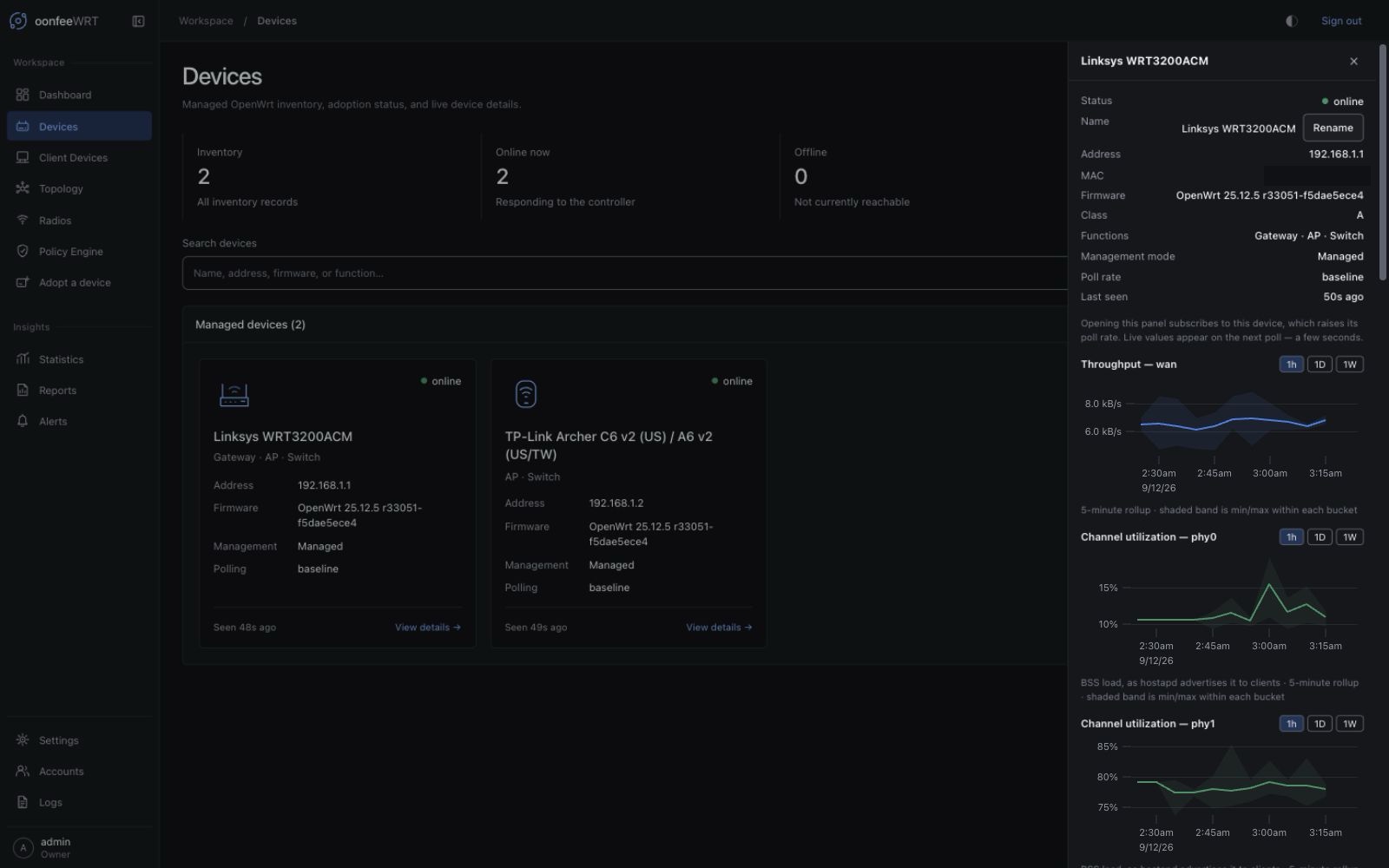
The detail view can include:
- name, address, MAC, firmware, management mode, class, and selected functions;
- load, memory, client count, and poll duration;
- traffic and radio time series;
- radio inventory and broadcast provenance;
- capability states and actionable source gaps;
- current collection tier and adjustable slower interval;
- controller requests, bytes, polls, and router CPU attributed to management;
- controller-installed package accounting;
- ownership state and reviewed change or un-adoption actions.
Read the effective WAN series
For a Gateway, the selector introduced in v0.1.3 uses the kernel device proved by the installed main-table IPv4 default route as the WAN traffic-series key. OpenWrt's logical interface and runtime counter device can differ: logical wan commonly maps to pppoe-wan on PPPoE. The device traffic chart uses pppoe-wan in that case, rather than selecting the first interface or a modem-management network. Device Detail receives this proved route-device candidate directly; its chart can remain empty until that exact interface has collected samples. Dashboard adds a stricter series-catalog check before labeling data as WAN throughput.
If the route cannot be mapped to exactly one active logical interface, the current v0.1.8 API explicitly reports no proved WAN interface and the UI leaves the WAN series unavailable. It does not guess from the metric catalog. Route evidence is refreshed on the slower network/topology cycle, approximately every 15 minutes; opening a focused device view does not make it a rapid failover monitor.
Focused collection
Opening a live device workspace can move it from the baseline collection tier to a faster focused tier. The verified defaults are approximately 60 seconds at baseline and 10 seconds while focused. Slow or overloaded devices can back off, up to 10 minutes, and Apply temporarily quiesces collection.
Use poll less often when management overhead matters more than freshness. Check the overhead card afterward rather than assuming the interval change had the intended effect.
Rename
Renaming changes the controller's display identity only. It does not rename the OpenWrt hostname. Use distinct names when two devices share the same model or default hostname.
Reprobe capabilities
Reprobe after a firmware upgrade, package change, ACL refresh, or when the UI says an older capability record has no answer for a new feature. Reprobe reads sources; it does not Apply site configuration.
Compare the new report with the earlier one. A newly missing source can be an ACL regression or package/module change, not necessarily lost hardware.
Refresh the ACL
Use ACL refresh only when the controller identifies that the adopted scoped identity lacks a currently required permission. This uses the device administrator credential for a bounded update. Review the exact payload again; do not treat it as a generic repair step for transport failures.
v0.1.4 adds read-only router UTC observation through luci.getUnixtime, with luci.getLocaltime as a compatibility fallback. An adoption created by an older release keeps its older ACL: device management, telemetry, Preview, and Apply continue normally, while router-clock status can be unavailable. If the clock comparison is useful, review and approve the updated access payload and wait for the next successful full poll. Re-adoption is not required. The refresh grants the read; neither the refresh nor the poll sets the router clock.
Optional LLDP
LLDP can improve physical topology evidence, but it is not part of adoption. It is unavailable for monitor-only devices because package installation and service configuration would cross their mutation boundary. For a managed device, the separate workflow can:
- refresh the OpenWrt package index after acknowledgement;
- show the exact official-feed package plan;
- install
lldpdand recorded feed dependencies after acknowledgement; - show the exact physical-interface configuration plan;
- record before-state, added packages, and service ownership for rollback.
Router package change
LLDP is the only shipped optional package workflow. Do not approve it merely to remove an “unavailable” label. Install it only when improved topology evidence is worth the storage, service, and change footprint on that device.
Rollback restores the recorded configuration and service state and removes only packages recorded as additions. A live LLDP ownership record blocks un-adoption until rollback is resolved.
v0.1.8 null-ledger display fix
An older LLDP ledger can contain a null or omitted package list. v0.1.8 normalizes that value to an array before the Devices screen renders it; an empty controller-added list says none recorded. That wording does not mean the package was already installed. No LLDP reinstall, re-adoption, controller reset, or database edit is needed for this display fix. Existing LLDP errors, ownership records, and rollback behavior are unchanged, so this does not claim to solve every LLDP installation failure.
In v0.1.4, fresh LLDP port evidence can also help distinguish a direct managed peer from client FDB entries merely seen through that peer. The current topology projection may hide the redundant transit candidate while a complete fresh multi-hop path exists. Raw intervals remain in history, and the candidate returns if direct proof becomes stale, fails, or closes. Installing LLDP does not turn an inferred client path into permanent truth.
Un-adopt safely
Un-adoption first plans restoration/removal of controller-owned configuration, then removes the scoped login and ACL. It does not rewrite human-owned UCI. That also means it does not reconstruct earlier values for the option-only management-LAN IPv6 patches that an operator explicitly Applied in v0.1.4. Switch the desired IPv6 policy deliberately before un-adoption or restore the needed operator values from a router backup afterward; Router managed alone is a no-op, not an undo operation.
Before starting:
- export a controller backup;
- make a router configuration backup;
- resolve any in-progress Apply;
- roll back optional LLDP;
- ensure the administrator credential and management path still work.
If the device is unreachable, the force path can remove the controller record but cannot prove router cleanup. Save the displayed residue report and manual commands. Do not assume a lost device is clean merely because it disappeared from the controller.
Troubleshooting
| Symptom | Check | Action |
|---|---|---|
| Scan finds no device | Bridged-container subnet visibility, routed subnet, subnet size, or controller reachability | Add the router by hostname or IPv4 address; verify the controller can route to its management endpoint |
| Inspection cannot connect | Address, administrator password, selected HTTP/HTTPS protocol, rpcd, uhttpd ubus handler, or firewall | Verify the ubus management endpoint from the controller host; SSH is not used by inspection |
| Adoption refuses managed Gateway | Another managed device already has the Gateway function | Keep one managed Gateway; use Monitor only to observe an additional routed router, or deliberately remove the old managed Gateway before replacing it |
| Monitor-only device has no Preview or optional LLDP mutation action | The mode intentionally fences desired configuration and optional LLDP installation/configuration/removal; existing LLDP observation and an acknowledged RF scan remain separate observation paths | Keep it monitor only for observation, or un-adopt and deliberately adopt with Managed authority after reviewing ownership and router impact |
| Host key or certificate changed | Factory reset, firmware reinstall, address reuse, interception | Verify identity out of band before force-un-adopting and adopting the device again |
| Metrics say unavailable | Source not readable, driver lacks metric, ACL gap, or no completed poll | Read the source explanation; reprobe or refresh ACL only when it names a repairable cause |
| Router clock status alone is unavailable after upgrade | The adoption's older ACL predates the read-only LuCI clock methods | If clock status is wanted, review and approve the updated controller-access payload, then wait for a full poll; do not re-adopt |
| WAN chart is unavailable | No current main-table IPv4 default, equal-metric/ECMP ambiguity, failed route/interface read, or no unique logical-interface mapping | Read the default-route source gap and wait for the next network/topology cycle after correcting the route; do not rename interfaces or refresh the ACL speculatively |
| Device flips offline/online | Slow polls, unstable transport, adaptive backoff, overloaded router | Review poll duration, overhead, controller logs, and network path before shortening intervals |
| Un-adoption is blocked | Active LLDP ledger or another conflicting operation | Roll back LLDP and allow active operations to finish |