

Read-only integrations
Find Integrations in v0.1.8
Open Settings → Integrations, or bookmark /settings?section=integrations on your controller. The older /integrations URL remains an alias for this tab. The page heading is Settings; the selected Integrations tab identifies its content. Opening it reads saved connection metadata without contacting AdGuard Home or a router.
The Integrations workspace adds focused visibility into an existing AdGuard Home service and WireGuard interfaces on an adopted OpenWrt router. It does not install services, create tunnels, change DNS protection, import configuration, or run arbitrary commands.
Added in v0.1.6
These integrations were introduced in v0.1.6. Checks are explicit snapshots, not background polling or scheduled monitoring. Missing evidence remains unknown. The screenshots were captured on 12 September 2026 from the v0.1.7 release-candidate UI source before tagging. No service was connected for these captures.
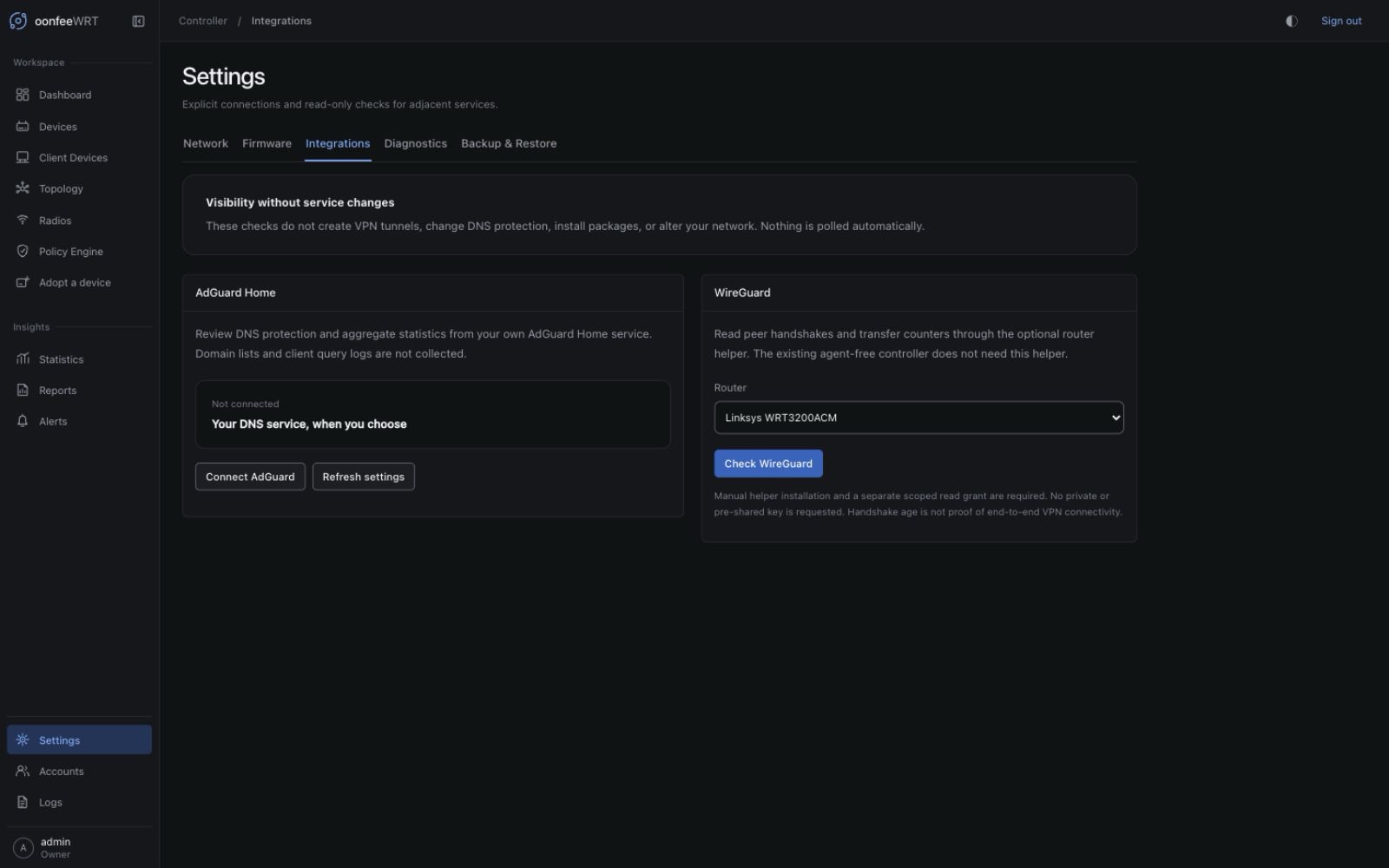
Permissions and effects
| Action | Controller role | Effect |
|---|---|---|
| View connection settings | Any signed-in role | Reads redacted controller-local settings. Passwords are never returned. |
| Save or remove AdGuard Home settings | Owner, with recent reauthentication | Changes only the controller's encrypted connection record and its audit log. |
| Check AdGuard Home | Admin or Owner | Makes two HTTPS GET requests to the explicitly configured server. |
| Check WireGuard | Admin or Owner | Reads one fixed method from the manually installed helper on the selected router. |
No external service is contacted merely because a connection was saved or a page was opened. AdGuard Home connection changes are saved and audited in one transaction. Check results identify the endpoint or device actually checked and include the observation time.
AdGuard Home
Connect an existing server
- Open Settings → Integrations, select Connect AdGuard, and enter the AdGuard Home HTTPS origin, for example
https://dns.example.net:3000. Enter only scheme, host, and optional port—not/control, a reverse-proxy subpath, or a login URL. - Enter its API username and password. These belong to the existing AdGuard Home service; the controller does not create an AdGuard account.
- Leave the certificate fingerprint blank for normal certificate-chain and hostname validation. If the private service uses a self-signed certificate, provide the exact leaf-certificate SHA-256 fingerprint after verifying it through a trusted channel.
- Reauthenticate with your controller password when prompted, and save.
- Explicitly check the service. Review the endpoint and check time next to the results before comparing them with another source.
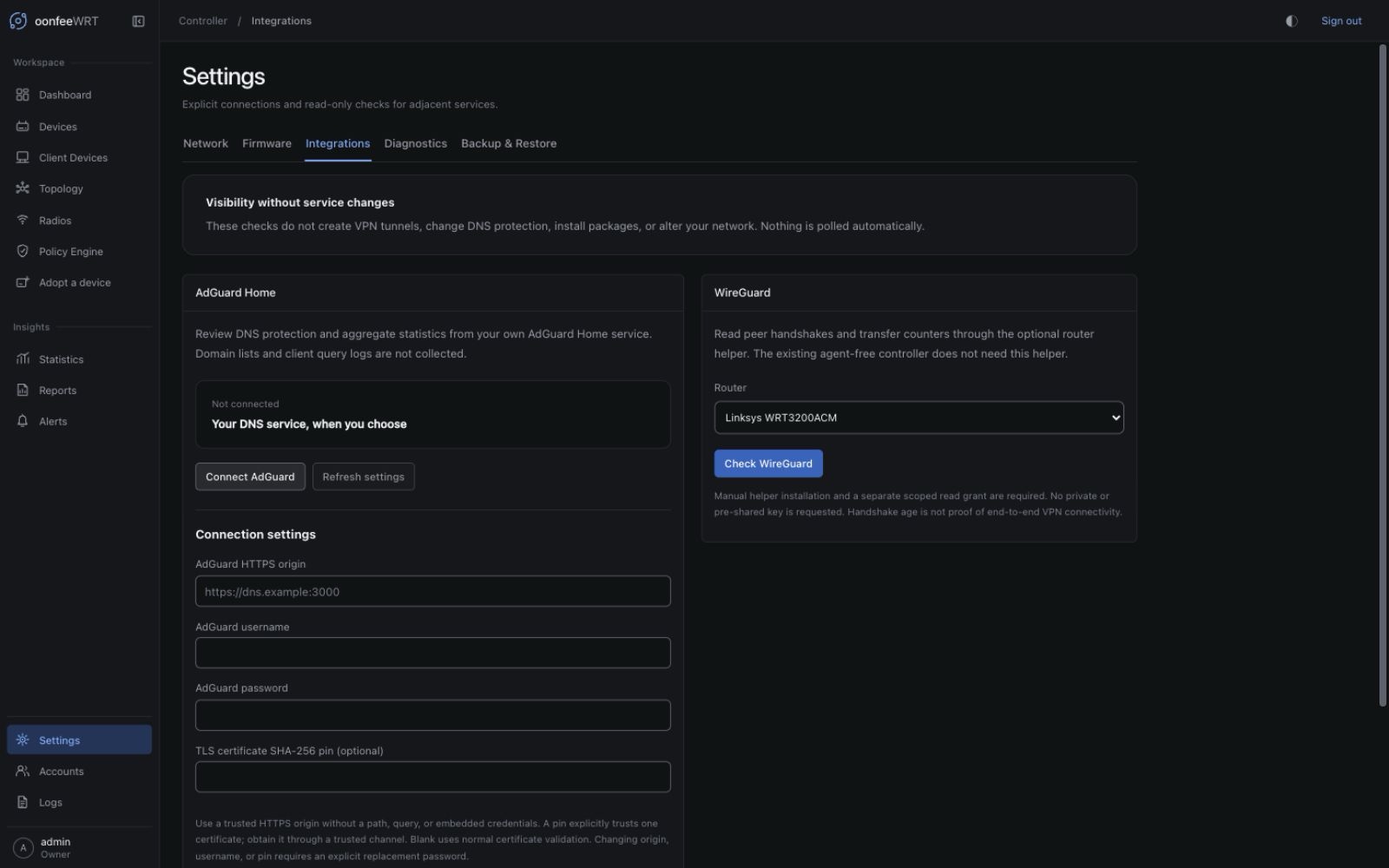
For a certificate file obtained through a trusted channel, its fingerprint can be inspected locally:
openssl x509 -in server.crt -noout -fingerprint -sha256Enter the hexadecimal fingerprint value, with or without colons. A supplied pin is an explicit alternative trust decision: the certificate must match exactly and be within its validity period. There is no “skip certificate checks” option. Certificate renewal requires reviewing and updating the pin when pinning is used.
The password field is not populated from storage. On an unchanged connection, leave password replacement off to keep the saved secret. Changing the origin, username, or certificate pin requires explicitly supplying a password again; an intentional empty password is allowed for a service configured without one. This prevents an old credential from silently following a changed destination.
If saved settings cannot be loaded, select Retry loading settings. An error does not mean no connection exists. An Owner can use Remove saved connection and confirm with their controller password even when the encrypted record is unreadable, then configure it again. Removal deletes only the controller's connection record and stored credentials; it does not stop or alter AdGuard Home.
What is shown
The adapter calls only:
GET /control/status
GET /control/statsIt shows the reported AdGuard Home version, DNS-running state, protection state, DNS-query count, count blocked by filtering rules, and average processing time converted from seconds to milliseconds. These fields follow the official AdGuard Home API.
Statistics describe the reporting window configured in AdGuard Home, not the time range selected on oonfeeWRT's Statistics screen. “Blocked by filtering” is not a sum of every possible protection module. The integration does not display or store query logs, queried domains, top-client lists, or raw upstream responses.
Observed, partial, and unavailable
- Observed: both requests returned usable expected fields.
- Partial: some fields were observed but others were missing or could not be read. Available figures remain visible; missing values are not filled with zero or copied from an older check.
- Unavailable: no usable status or aggregate was observed. Check the address, certificate, credentials, service API access, and controller reachability.
A reported false protection state means protection was reported disabled; a missing protection field means it was not observed. Likewise, zero DNS queries is a valid measured zero only when the service actually returned it.
Connection safety
Credentials and the complete connection configuration are encrypted in the controller database using its keyring. API responses expose only the normalized origin, username, fingerprint, and a password-present flag. Backups therefore remain sensitive; keep controller backup files and their passphrases protected.
Explicitly configured private IPv4 and IPv6 ULA services are supported. Plain HTTP, embedded URL credentials, query strings, fragments, paths, loopback, link-local, multicast, common cloud-metadata addresses, shared-address space, and selected IPv6 translation/tunneling ranges are rejected. All DNS answers must pass address checks before the client dials a validated address. Requests do not use environment proxies or follow redirects, and response sizes and deadlines are bounded. A redirected authentication page is a failed check, not a service status result.
The integration uses AdGuard Home's documented Basic authentication mechanism. Although oonfeeWRT makes only read requests, a service credential may have broader rights within AdGuard Home itself. Restrict access to that credential accordingly.
WireGuard
Enable the optional read path
- Review the optional router helper and build/install its current source package manually on the intended router.
- Confirm the router already has WireGuard tools if WireGuard visibility is wanted. The helper does not install or configure them for you.
- Explicitly grant only
oonfeewrt-agent-readto the controller's rpcd login. Default adoption ACLs are not expanded automatically. - In Settings → Integrations, select the adopted router and request a WireGuard check.
The controller opens its existing authenticated router channel and reads the helper's fixed wireguard method. Reads are coordinated with per-device operations; baseline polling pauses briefly during the check. No tunnel is started, stopped, modified, or actively probed.
Understand peer evidence
The helper selects only interface names, latest-handshake timestamps, and transfer counters using fixed wg show arguments. It does not read a full configuration or dump and then try to redact keys. Only public peer keys are included as identities.
For each observed interface and peer:
- Public key identifies the peer; it is not a private or preshared key.
- Last handshake is the timestamp reported by WireGuard. A zero timestamp is displayed as never observed, not as January 1970.
- Received / transmitted bytes are cumulative runtime counters. They are not per-second throughput and can reset when a peer or interface is recreated.
- Unknown means a corresponding field was not returned. Separate command reads can capture a peer being added or removed between observations.
An old handshake does not prove the tunnel is broken: WireGuard is deliberately quiet when idle. The integration does not label peer connectivity from a guessed handshake-age threshold. See the official WireGuard quick start.
No interfaces versus no evidence
A successful, empty runtime observation means no WireGuard interfaces were reported during that check. A missing helper, insufficient ACL, missing wg tool, failed router request, changed interface set, oversized response, or invalid data is unavailable evidence, not zero peers or “VPN offline.”
Read responses are capped at 64 interfaces and 1,024 peers. Unsupported or ambiguous output is rejected instead of being turned into a plausible graph.
Current boundaries
SNMP switch discovery, integration-driven alerts, historical integration rollups, AdGuard protection controls, WireGuard provisioning, and automatic helper deployment are not included. Configure those services in their native administration tools; use this workspace for explicit, read-only visibility.