

Firmware and optional router helper
Find Firmware in v0.1.8
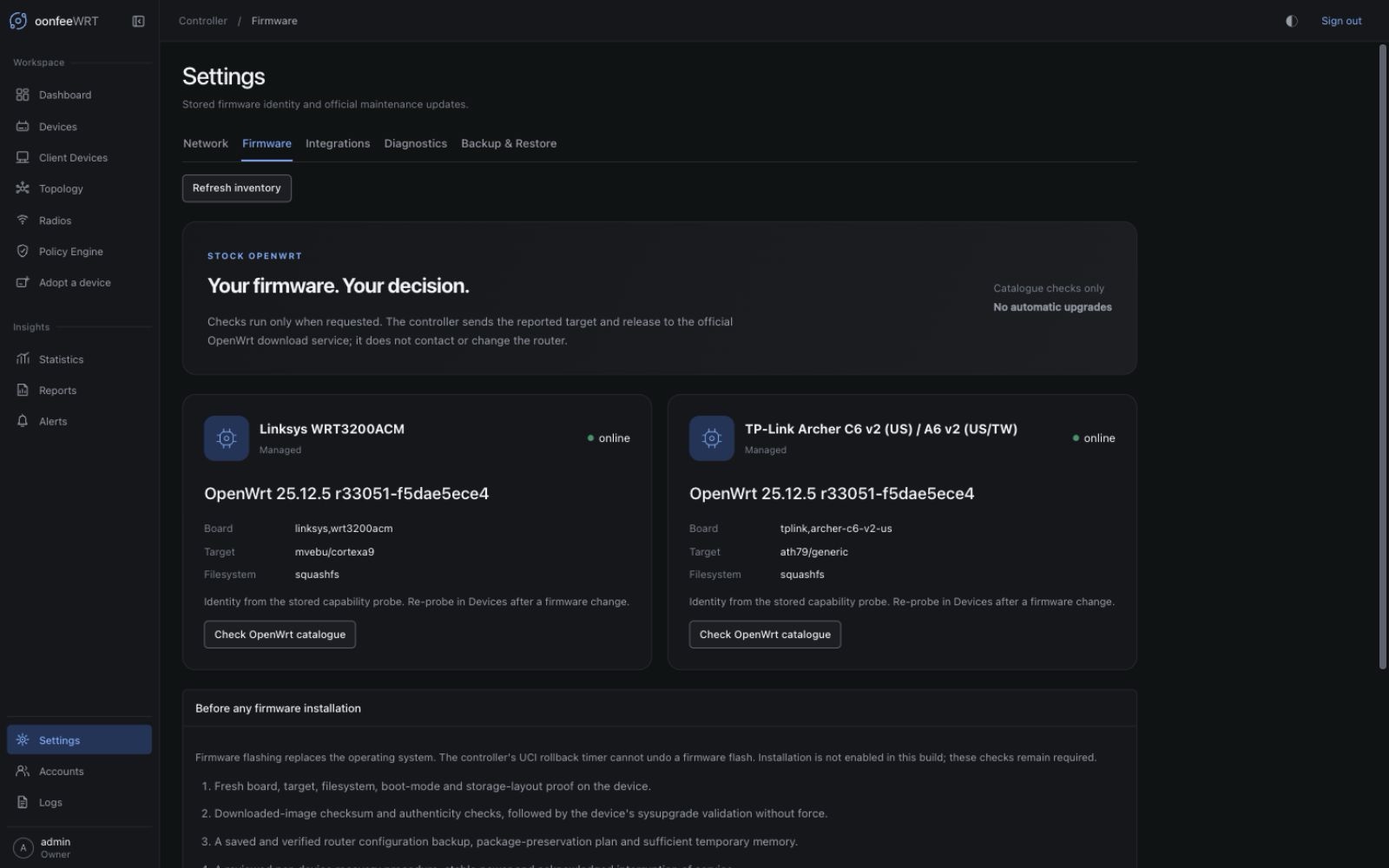
Open Settings → Firmware, or bookmark /settings?section=firmware on your controller. The older /firmware URL remains an alias for this tab. The page heading is Settings; the selected Firmware tab identifies its content. Opening the tab reads stored inventory only—it does not check the catalogue.
The Firmware workspace answers a focused question: does the official OpenWrt catalogue list a newer maintenance release for this device's reported board, target, and filesystem? It includes matching download metadata and a clear explanation when the controller cannot choose an image safely.
Added in v0.1.6
This workspace and the optional helper source were introduced in v0.1.6. They do not add automatic flashing, scheduled upgrades, or a router-side remote command service. Existing adoption continues to work without a custom agent. The screenshots were captured on 12 September 2026 from the v0.1.7 release-candidate UI source before tagging. The helper remains experimental and requires separate OpenWrt SDK and hardware validation before deployment.
Check for a maintenance update
- Open Settings → Firmware and identify the intended device by its name and reported firmware. Only adopted devices appear.
- Review the board name, target, and root filesystem. These facts come from the stored capability probe, not a new hardware query performed by this page.
- If the router was reflashed or its identity is incomplete, open its Devices details and re-probe it first. A poll that reports firmware different from the saved probe invalidates the old identity for image selection.
- Use the check action. An Admin or Owner is required. The controller fetches metadata from
https://downloads.openwrt.org; its requests disclose the target and release being checked, not router credentials or client MACs. - Read the result and check time. Checks are on demand. Leaving the page open does not enable periodic downloads or upgrades.
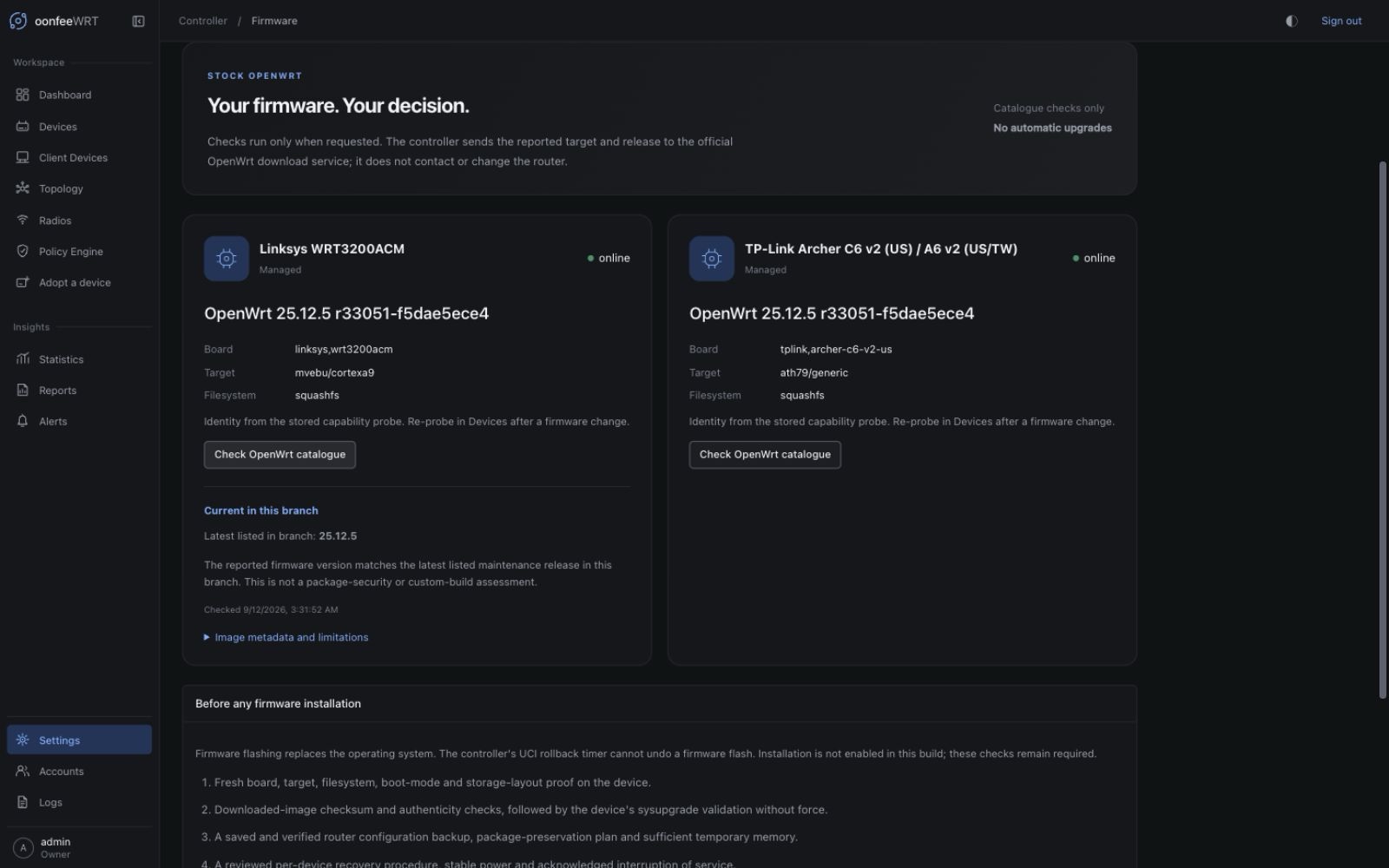
This check matched the Linksys WRT3200ACM's stored linksys,wrt3200acm board, mvebu/cortexa9 target, and squashfs filesystem to the official OpenWrt 25.12.5 catalogue. It describes this one device at the displayed check time; no firmware image was downloaded, installed, or validated on the router.
Understand the result
| Result | What it means | What to do |
|---|---|---|
| Update available | One matching sysupgrade image is listed for a newer maintenance version in the current branch. | Review the image and device-specific upgrade instructions. It is not yet validated for installation. |
| Current | The reported firmware version matches the newest listed maintenance version in the branch. | No version update was found. This does not assess installed-package vulnerabilities or custom-build contents. |
| Ahead of catalogue | The reported firmware version is newer than the catalogue lists. | Check again later or verify the build source. Do not downgrade to make the versions match. |
| Unsupported / cannot select | Identity is incomplete, the branch is not listed as stable/oldstable, or a unique matching image could not be proved. | Re-probe if identity is missing; otherwise use OpenWrt's device-specific guidance. |
| Check failed | The catalogue could not be reached or validated. | Check controller internet access and retry. A failed check never means “up to date.” |
Results describe a single check, not a permanent guarantee. The page does not persist a successful result through a controller restart or silently reuse it after a failed request.
How matching works
The controller reads the official stable/oldstable catalogue and stays within the router's current release branch. For example, a router reporting a stable 25.12.x release is not automatically offered a different YY.MM branch.
The image catalogue must name the requested release and target. Selection also requires all of the following:
- the exact reported board name appears in
supported_devices; - exactly one profile matches that board;
- exactly one image has type
sysupgradeand the reported filesystem; - the filename is valid for the requested release and target;
- a valid SHA-256 value and positive, bounded image size are present.
Names resembling the router model are not a compatibility test. Factory, initramfs, rootfs-only, ambiguous, and mismatched images are not selected. Snapshots and non-OpenWrt distributions use their own upgrade paths.
Generic x86, armsr, and loongarch systems are deliberately not auto-matched: their combined images also depend on boot mode and disk-layout details that the current stored probe does not capture. See the official image-selection guidance.
Download metadata is not a flash approval
The displayed checksum is the checksum published in the HTTPS catalogue. oonfeeWRT has not downloaded the firmware, checked its bytes, validated a signature, executed sysupgrade -T, or confirmed that settings can migrate. There is no enabled Install button in v0.1.8.
Before using an image outside the controller:
- Read the device's OpenWrt upgrade and recovery guidance, including any hardware-revision, bootloader, or dual-partition restrictions.
- Keep a known-good recovery image and a recovery connection available.
- Back up the router configuration and save the package list. A controller backup is not a full router backup and does not replace this step.
- Decide how custom packages and configuration will be preserved. A normal firmware image need not contain packages you installed later. The official owut guide explains attended upgrades that include the installed package set.
- Verify the downloaded image's checksum, image type, and device compatibility, and ensure sufficient temporary memory, stable power, and an acceptable service-interruption window.
- Follow the approved OpenWrt installation workflow and verify device identity, firmware, connectivity, configuration, and controller access after reboot.
OpenWrt firmware installation replaces the operating-system image. The controller's UCI configuration-apply rollback timer does not roll back a firmware flash. See the official upgrade overview and LuCI verification procedure.
Optional read-only router helper
The source tree includes an OpenWrt SDK package at deploy/openwrt-agent. This is a small, on-demand rpcd executable, not a continuously running daemon. It opens no extra listening port, makes no cloud connection, and contains no arbitrary-command, configuration-write, download, or flash method.
Its four read-only methods use protocol version 1:
| Method | Returned evidence |
|---|---|
status | Helper/protocol version, read-only mode, and whether sysupgrade and owut commands are present. Presence does not prove upgrade compatibility. |
board | The router's existing ubus call system board response. |
info | The router's existing ubus call system info response. |
wireguard | Runtime interface names, public peer identities, handshake timestamps, and byte counters through fixed public-field selectors. No private or preshared keys are collected. |
Installation requires manually building and installing the package and explicitly assigning its separate read ACL to any non-root rpcd account that should use it. It does not change the default adoption ACL or automatically grant the controller access. The Firmware screen does not query the helper, so not observed is not a claim that it is installed or absent. The separate Integrations workspace can explicitly read its WireGuard method after installation and permission review.
Follow the package's build and opt-in instructions. The implementation follows OpenWrt's documented executable-plugin interface. The package source and host-side contract tests are available now; SDK package builds and router installation still require platform validation before production deployment.
What remains before controller-managed flashing
Full firmware lifecycle management is not complete. Enabling it requires a separately reviewed implementation for:
- fresh device identity and image validation without force overrides;
- bounded transfer and verified image bytes/authenticity;
- saved, verified router backups and a package-preservation strategy;
- explicit per-device opt-in, recent reauthentication, and a reviewed maintenance window;
- durable staging/confirmation records and conservative handling of interrupted or indeterminate operations;
- post-reboot verification and hardware-tested recovery procedures.
The read-only helper does not bypass these requirements. Automatic upgrades, fleet-wide flashing, and an unattended firmware recovery promise are not provided.