

Logs and diagnostics
Logs explain controller and network events; diagnostics package a bounded, redacted subset of stored controller evidence for support. Diagnostics do not poll or change routers while generating a bundle.
The Alerts workspace introduced in v0.1.6 remains available under Insights → Alerts in v0.1.8 for configured sustained conditions, incident history, and opt-in webhook delivery. It does not replace General/Audit logs or their coverage record. A delivery failure describes the notification path, not necessarily the router; use the incident time with Statistics and Reports before drawing conclusions. Reports CSV and controller diagnostics are different exports with different contents.
General and Audit logs
Open Logs and choose the appropriate view:
- General — device health, collection, topology, RF, controller operations, and other operational events.
- Audit — authenticated administrative and security-relevant actions, such as account changes, adoption, Apply, backup/restore, or session operations.
The exact detail panel preserves source provenance and fields that would be too dense for the table.
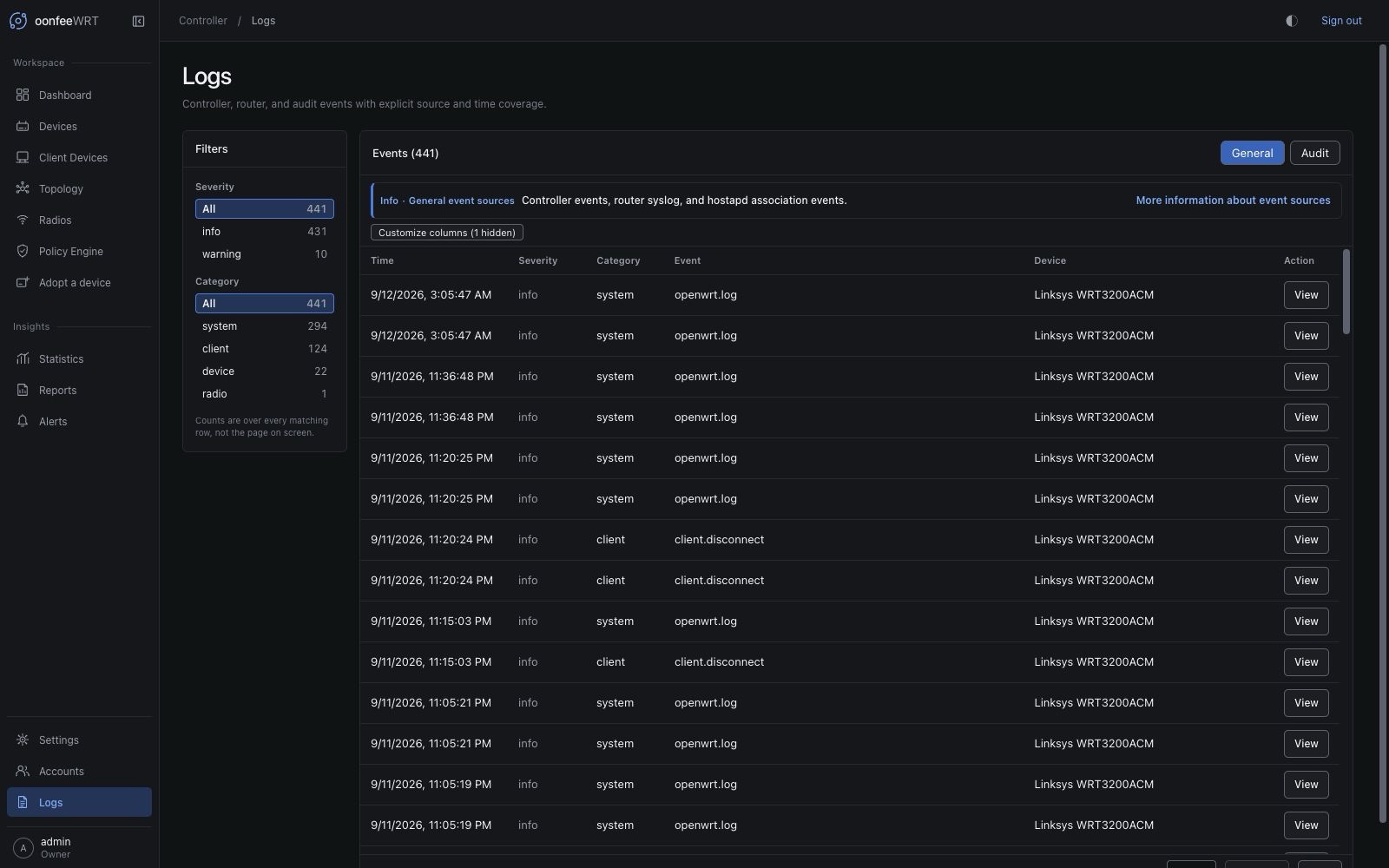
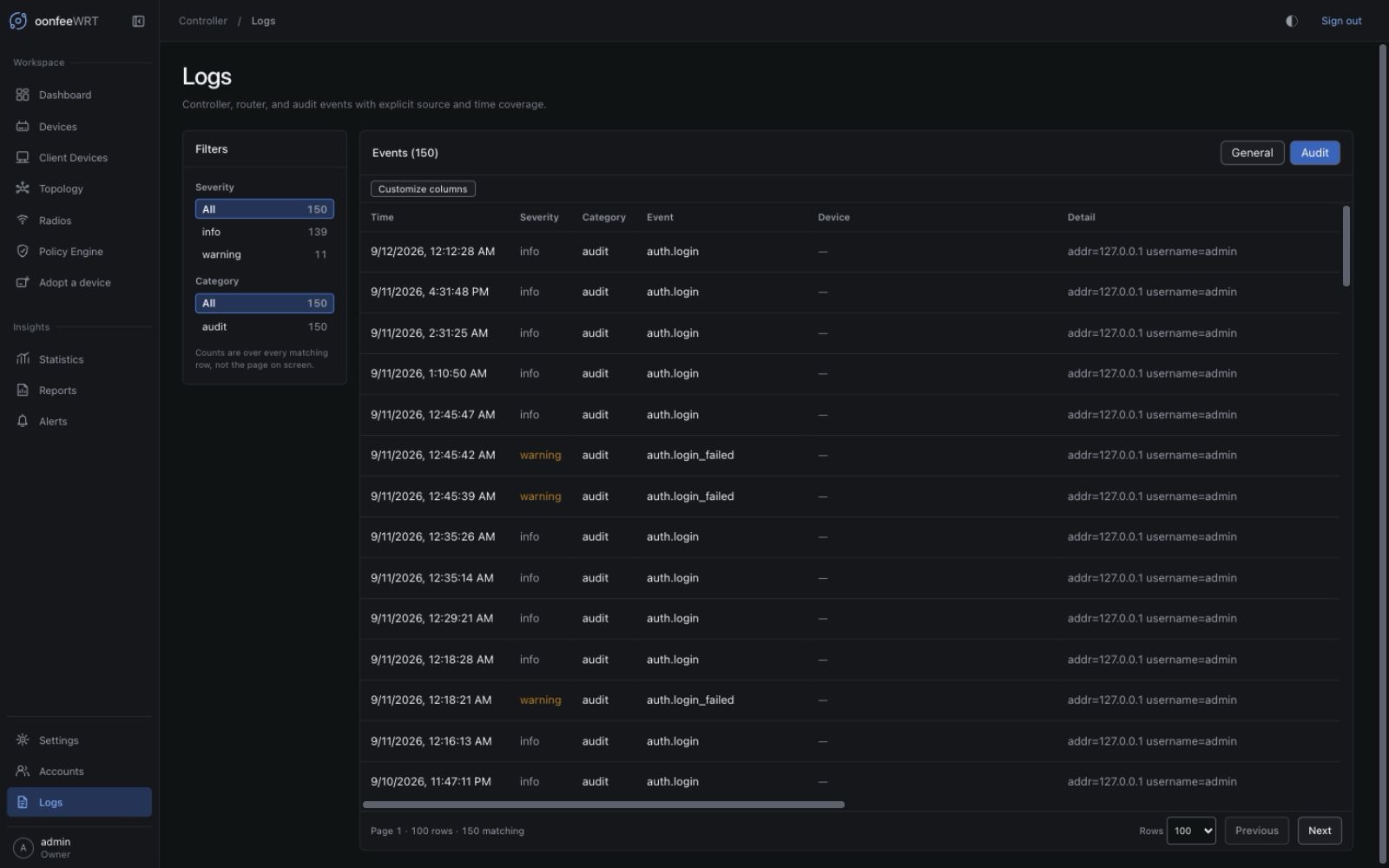
Filter effectively
Use filters/facets before paging. The event store applies the filter before the limit and uses keyset pagination, so a page is a stable slice of the matching history rather than an unfiltered batch trimmed in the browser.
A useful incident filter sequence:
- choose General or Audit;
- set severity and category facets when available;
- page backward to the time around the first symptom;
- use the Device column to locate events for the affected router;
- open exact details rather than inferring from the short message;
- note source gaps and timestamps;
- correlate with Dashboard, Client Observability, or Topology at the same time.
v0.1.8 does not provide a device or free-text search filter on the Logs page.
Understand router-log coverage
Coverage describes which router-log intervals the controller can establish. It is not a warning that logs grow without a limit, and a stored cursor alone does not prove that a router is currently reachable.
In v0.1.8, Router log coverage separates two cases:
- Current collection is up to date; earlier history is unavailable. The compact information disclosure preserves the affected routers and gap details. Keep the controller and routers reachable; if gaps recur during continuous collection, investigate excessive router logging. The retained gap indicator expires 24 hours after the last discontinuity if no new one occurs. A successful poll cannot reconstruct the missing interval.
- Coverage is missing or out of date. This remains a warning. Open the named device, check connectivity and What the controller cannot read here, and fix the reported cause. Refresh the controller-access payload only for a reported permission denial, then allow the normal collection cycle. Check again reloads the stored view; it does not force a router poll.
A saved continuation cursor can fall outside the next bounded log batch after a collection pause or high message volume. The controller cannot always distinguish the router overwriting its log ring from the batch-size limit. Do not delete retained evidence or repeatedly change credentials to hide an earlier gap. See source notices and remedies.
Understand the active IPv6 condition
On Logs → General, v0.1.4 adds an IPv6 condition card above the event table. It recognizes only the exact OpenWrt odhcpd warning that router advertisements have no usable default route. The card is queried independently of the selected event filters and page, so paging past the underlying event or filtering out warnings does not hide an active condition. It names affected routers, totals occurrences, explains that IPv4 is unaffected, and links to the network IPv6 editor through Review IPv6 and Apply.
The card and stored event rows answer different questions:
- Active card: the latest matching warning was received within 10 minutes, in the current router-log producer epoch, and the router-log cursor is no more than three minutes stale.
- Historical row: a compact record remains available for investigation even after it is no longer recent. Fifteen minutes of quiet with continuous fresh coverage can classify it as historical.
- Unknown: stale coverage, a continuity gap, a clock anomaly in controller receive time, or an unsettled producer-epoch change prevents either an active or cleared claim. Read the coverage notice; an absent active card alone is not proof of resolution.
Exact repeat compaction shipped in v0.1.1: new repeats increment one condition row per router-log producer epoch rather than adding one event row each, and every startup transactionally condenses matching legacy raw rows before the API serves. v0.1.4 adds the current-condition classifier and guided card, not the underlying compaction. Original receive evidence is preserved, so the startup pass does not make an old warning active. With fresh coverage the banner clears after the warning is no longer recent; continued quiet reaches historical classification after 15 minutes. Neither path changes or deletes the router's own logd messages.
To resolve the source, open the primary management network, choose Prefix delegation if a working upstream delegation should be served or Disabled if that LAN should not run IPv6, then generate a fresh Preview and Apply it. Router managed preserves existing option values and does not clear the source condition by itself. Do not delete event rows as a repair.
Interpret router-clock warnings
The General view also compares a router's freshly observed UTC epoch with the controller. A notice appears only for a fresh, successful comparison whose absolute offset is at least five minutes. It uses luci.getUnixtime, with luci.getLocaltime as an older-OpenWrt compatibility fallback. This is a read-only measurement; oonfeeWRT does not set either clock.
General events remain ordered by the router-supplied source time. The clock notice does not rewrite older event timestamps or reinterpret delivery delay as clock skew. Correct NTP reachability and synchronization in OpenWrt, then wait for a successful full device poll.
Adoptions created before v0.1.4 retain their older scoped ACL. Normal polling, Preview, and Apply continue to work, but clock status alone can remain unavailable. If that status is wanted, an Administrator must open the device, review, and approve the updated controller-access payload; re-adoption is not required. Do not refresh access merely because a historical event has an unexpected timestamp—first confirm that the UI names the clock source as unavailable.
Retention boundaries
- OpenWrt-origin logs: 24 hours, bounded to 50,000 per device and 100,000 globally.
- Controller/audit history: bounded to 100,000 records.
Retention is deliberately bounded. Export a diagnostics bundle or record the needed evidence before a long investigation exceeds the window. A bundle is a support snapshot, not a replacement for a dedicated long-term log platform.
Generate a diagnostics bundle
Users with the required administrative permission can open Settings → Diagnostics.
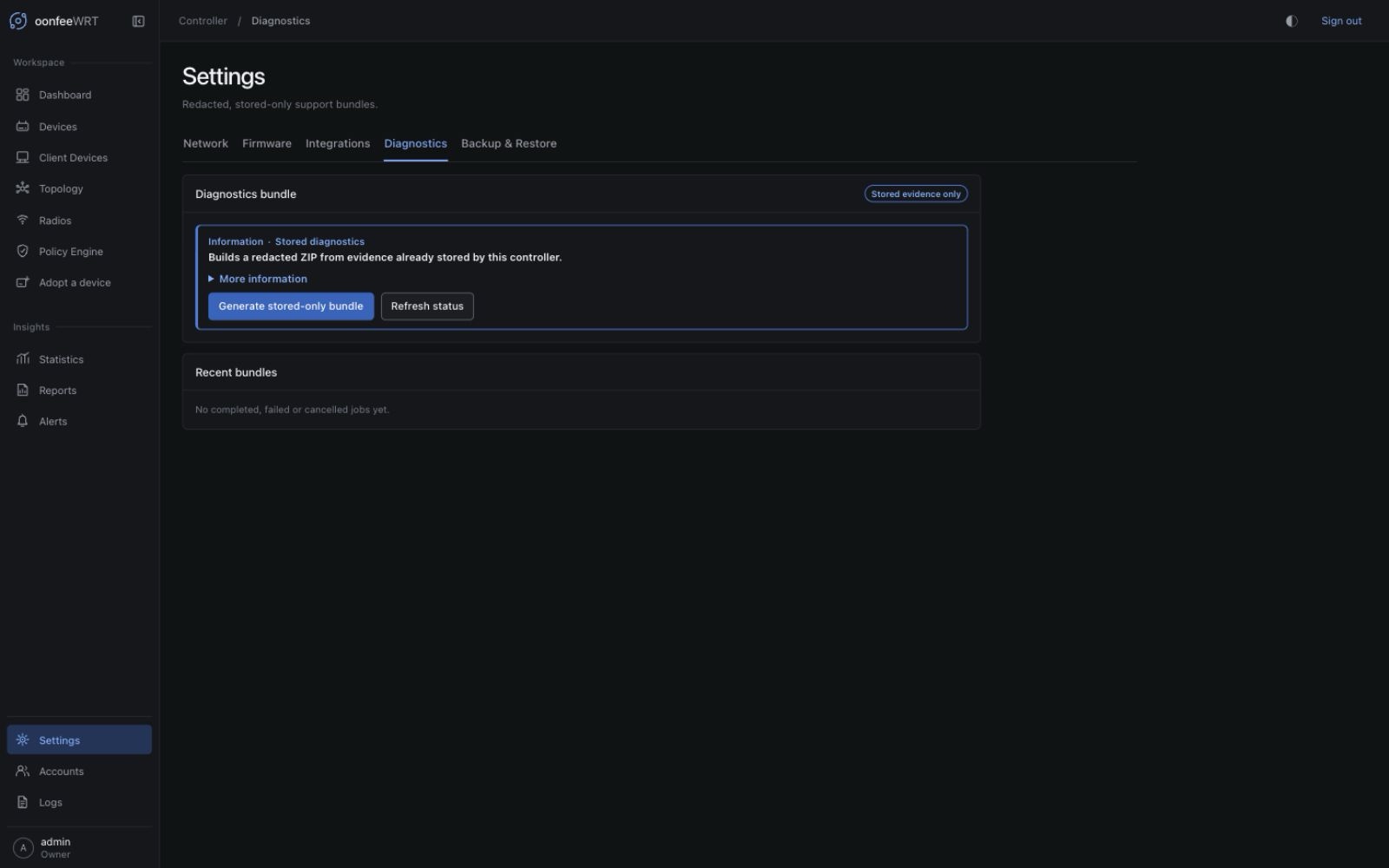
- Read the descriptor before generation. It lists included sections, excluded secret classes, and size limits.
- Confirm it reports
router_management_calls=falseandrouter_changes=false. - Select Generate stored-only bundle.
- Watch the job state. Only one active generation is accepted at a time.
- Download the completed ZIP.
- Store and share it as private network metadata, even though it is redacted.
The bundle content is bounded to 16 MiB plus 1 MiB of archive overhead. Job history exposes completed, failed, and cancelled outcomes instead of hiding a failed collection.
What diagnostics include
The UI's descriptor is authoritative for the current build. Typical stored evidence categories can include:
- controller version, schema, platform, uptime, health, migration, and integrity metadata;
- adopted device model, target, firmware, kernel, package-manager, and capability records;
- bounded events/audit evidence;
- stored topology-source/edge, radio-scan, event-source, and source-gap summaries;
- sanitized controller log material;
- a manifest describing sections, limits, and router-call/write assertions.
Generation uses the database/log evidence already on the controller. It does not contact Fleet or fetch a fresh secret-bearing router configuration.
What diagnostics exclude
Redaction and exclusion cover secret-bearing classes such as:
- router credentials;
- WLAN and mesh keys;
- private keys and keyring material;
- session cookies/tokens and CSRF material;
- controller runtime/export passphrases;
- account password hashes and authentication secrets.
The generator also sanitizes sensitive key names and patterns in stored text. No automatic redactor is a reason to publish internal diagnostics publicly. Review distribution and delete third-party copies when the support need ends.
Verify a downloaded bundle
- Confirm the ZIP size is within the descriptor limit.
- Open the manifest first.
- Check controller version and generation time.
- Confirm included/excluded sections match the UI disclosure.
- Search the extracted copy for known local secret canaries only in a private environment if you maintain a formal validation procedure.
- Share through an access-controlled channel.
Do not edit the bundle and then present it as controller-generated evidence; keep the original hash/file when chain of custody matters.
Troubleshooting logs
| Symptom | Explanation | Action |
|---|---|---|
| Expected event is absent | Wrong view/filter, retention expired, operation never crossed its audit boundary, or storage error | Clear filters, check both views, inspect controller logs and durable operation receipt |
| Device log stream stops | Device/source unavailable or log retention/collection gap | Open device capability/source state and correlate last successful poll |
| IPv6 condition count is large but the table has one row | Exact repeats are condensed per router-log producer epoch | Use first/latest evidence and occurrence count; fix IPv6 at the source rather than deleting the row |
| Old IPv6 row remains but no active card is shown | Retained history and current condition status are independent | Check fresh log coverage and latest receive time; a historical row can remain until retention, while stale/gapped coverage is unknown rather than cleared |
| Timestamps appear surprising | Browser locale, router clock skew, or source time differs from controller receive time | Use exact detail, check the fresh Router clock notice, and compare controller/router UTC without changing either clock |
| Router clock status is unavailable after upgrade | The older adopted ACL lacks the new LuCI clock-read methods, or the latest full poll could not obtain them | Review the device's named access gap and approve the updated ACL payload only if clock status is wanted; do not re-adopt |
Troubleshooting diagnostics
| Symptom | Explanation | Action |
|---|---|---|
| Generate is unavailable | Role does not permit diagnostics or another exclusive operation is active | Sign in with the required admin role and let backup/restore/other conflicting work finish |
| Job fails on size | Stored evidence exceeded a bounded section/archive limit | Read the terminal detail; reduce unrelated retained evidence only through supported maintenance, never delete DB files manually |
| Download is refused | Job expired, state changed, or artifact validation failed | Generate a new bundle and preserve the terminal error for support |
| Bundle lacks a live router value | Diagnostics intentionally use stored evidence only | Reproduce/collect the source through normal controller polling first, then generate a new bundle |
| You suspect failed redaction | A local name/value resembles an uncovered secret pattern | Do not share the file; report the issue privately with a synthetic reproducer rather than the real secret |