

Radios and channel planning
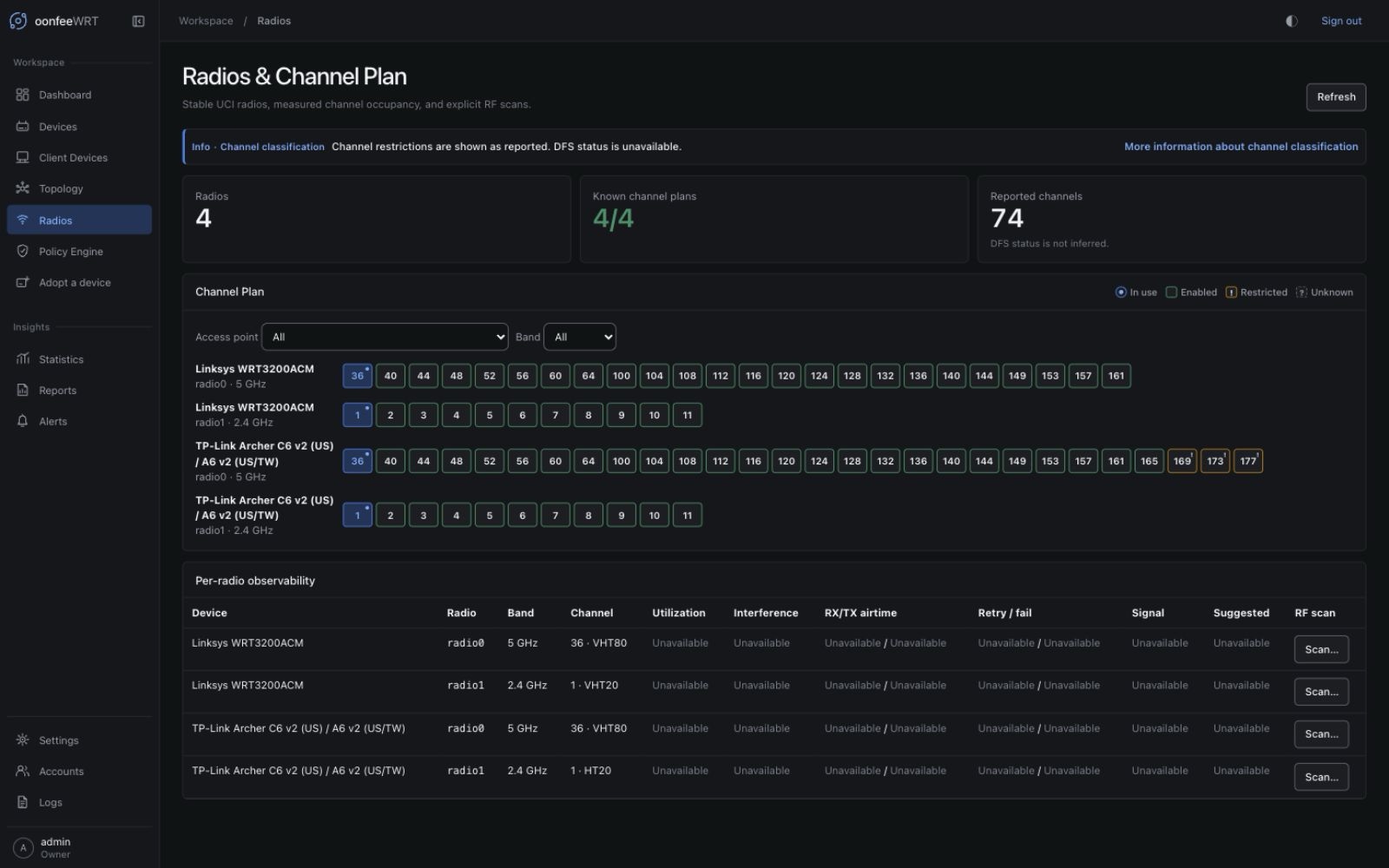
The Radios workspace combines inventory, measured RF data, source gaps, and an evidence-aware channel plan. It helps you decide what to investigate; it does not claim spectrum knowledge the hardware did not report.
In v0.1.8, compare the exact stable-radio series in Statistics when one current RF value needs historical context. A cleaner chart or compact channel-classification note does not fill missing measurements or remove DFS restrictions. The isolated demo has a synthetic populated channel plan for UI exploration; its radio values are not scans or hardware compatibility evidence.
What the workspace contains
Channel Plan
The channel plan lays out known radios, bands, current channels, and evidence that can support a placement decision. The per-radio table adds utilization, interference, airtime, retry/failure, signal, and a scan-derived channel score when those sources are available. The latest scan row shows its outcome and BSS count; v0.1.8 does not display the raw BSS inventory.
Treat it as a plan, not an automatic optimizer:
- a missing scan does not mean the channel is clear;
- channel width changes the overlap picture;
- 2.4 GHz, 5 GHz, and 6 GHz rules differ by regulatory domain and hardware;
- DFS channels can require radar handling and availability checks;
- client compatibility can matter more than the cleanest measured channel;
- observations from one AP do not describe the exact RF environment at another AP.
Per-radio observability
The v0.1.8 UI presents Channel classification as compact information, not a router fault. OpenWrt's freqlist.restricted flag does not prove DFS status, and the current controller does not persist explicit DFS or configured channel-exclusion evidence. Channels stay Restricted or unknown where appropriate. Refreshing or running an RF scan cannot supply that missing classification. Consult the router's wireless settings and driver information for the restrictions it reports; do not bypass them to clear a notice.
Each radio row identifies the device, stable radio key, band, channel, utilization/interference and related metrics, scan capability, and source state that the controller can establish. The stable key is the configured UCI wifi-device section, such as radio0, not a runtime PHY or BSS name. v0.1.8 keeps distinct section keys when multiple configured radios share one PHY and fails Preview closed when those targets cannot be resolved uniquely.
Values can be:
- Observed — a valid recent sample exists;
- Stale — earlier evidence exists but has crossed its freshness window;
- Refresh failed — an older sample is shown with a failed latest attempt;
- Unavailable — the required source or capability is not available;
- Not measured yet — no successful collection/scan has produced a value.
Do not compare an observed value with an unavailable one as though both were numbers.
Plan a channel change
- Confirm every intended AP appears and has the AP function.
- Separate radios by band and channel width.
- Review current-channel reuse among APs that can hear each other.
- Check utilization, interference, and scan timestamps, not only their values.
- Review the scan-derived suggestion and its evidence limits.
- Consider the physical floor plan, wall materials, transmit power, and client density that controller telemetry cannot infer reliably.
- Make one approved channel change at a time in LuCI or through an audited device-specific OpenWrt workflow.
- Refresh oonfeeWRT and compare client experience and new measurements after the change.
oonfeeWRT v0.1.8 does not include spectrum analysis or an automatic channel change loop, and it has no radio-channel editor or Apply path. Its planner is read-only; only the separately acknowledged RF scan can disrupt a serving radio.
Run an RF scan
Client disruption
An active scan can take the serving radio off-channel. Associated clients may pause, roam, or disconnect. Do not scan a sole production AP or a wireless backhaul radio without a recovery and timing plan.
- Open Radios.
- Find a row whose scan capability is Present and whose radio interface is known.
- Select Scan.
- Verify the device and radio key in the dialog.
- Read and accept the disruption acknowledgement.
- Start the scan once and wait for its terminal state.
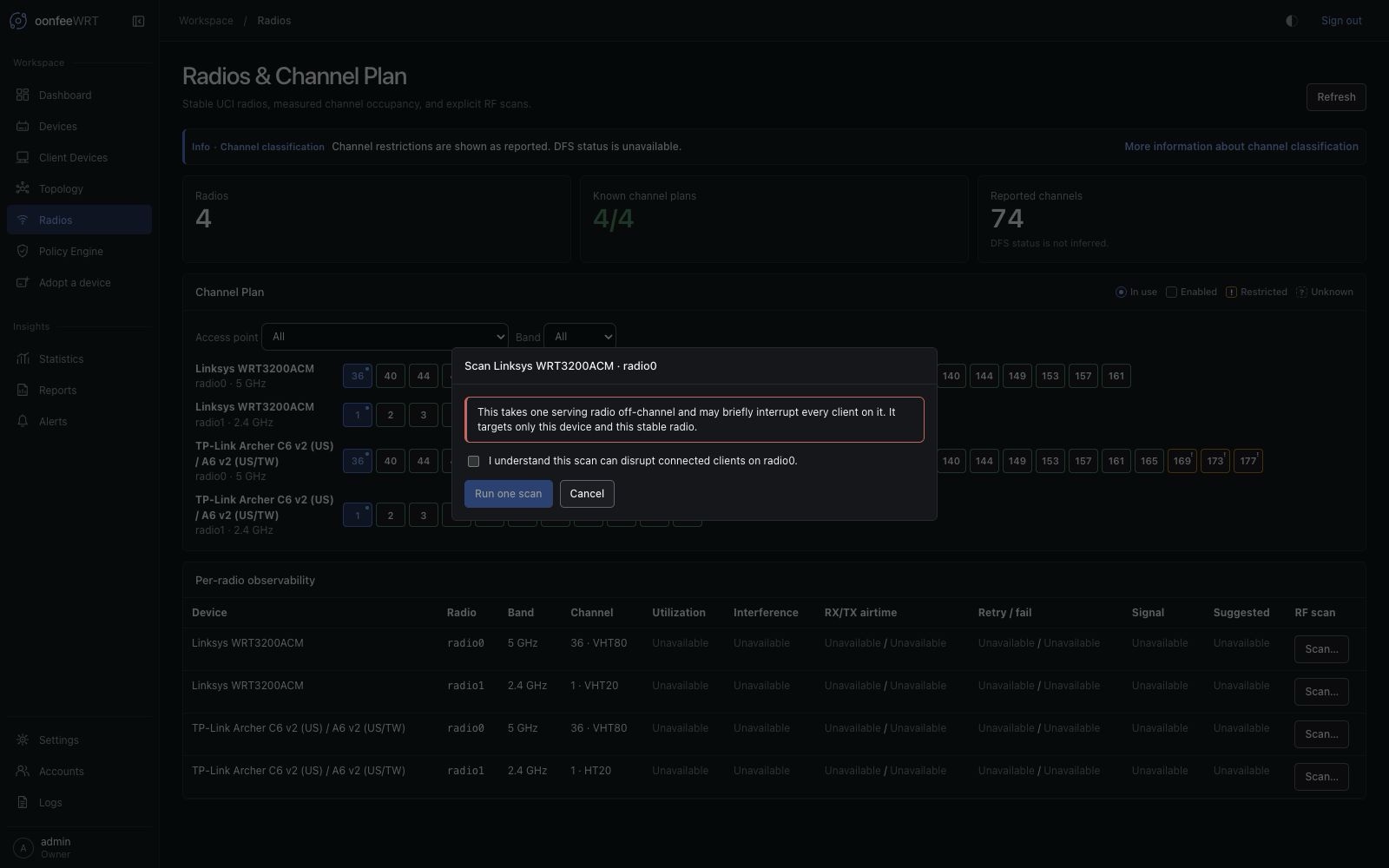
The controller persists the latest terminal scan result for each radio. It does not build an unlimited scan archive. Record a before/after comparison outside the controller when a long-term RF study matters.
RF scan is also available on a Monitor only device when its capability is Present. Monitor only fences persistent desired/package/configuration authority; it does not make this active observation passive. The same separate acknowledgement is required, the serving radio can take clients off-channel, and the scan has no intended persistent configuration change.
Verify the result
- Confirm the terminal result belongs to the intended device and radio.
- Check its timestamp and outcome.
- Inspect the terminal outcome, BSS count, scan-derived suggestion/basis, and any explicit source gaps.
- Confirm clients returned and the radio resumed its expected channel.
- Review Logs if the scan failed or the AP became unreachable.
Interpret common metrics
| Metric | What it can indicate | What it cannot establish alone |
|---|---|---|
| Channel utilization | How busy the radio reports the channel during the sample | Which transmitter caused the activity or whether user traffic was harmed |
| Interference | Controller-derived airtime not explained by its tracked TX/RX split | Complete interference spectrum or non-Wi-Fi source identity |
| Scan BSS count and suggestion | How many BSS rows a terminal scan returned and the transparent overlap score derived from them | Raw BSS details, hidden transmitters, client-side visibility, or continuous occupancy |
| Client RSSI | Signal at the AP for a client sample | Downlink signal at the client, throughput, or roaming readiness |
| Retry-related values | Link quality when the driver exposes a trustworthy source | A complete fleet retry rate when the focused source is absent |
Correlate RF metrics with client path, traffic, latency, events, and the time of the observation.
Troubleshooting
| Symptom | Explanation | Action |
|---|---|---|
| Scan button is unavailable | Capability is absent/unknown, interface name is missing, or driver source is not exposed | Reprobe the device and read the capability reason; do not install unrelated packages blindly |
| Utilization or interference is unavailable | Driver/rpcd source is missing, required counters disagree, or no valid poll has completed | Focus the device workspace, wait for collection, and check source gaps |
| Scan completes with few results | Quiet environment, band/channel visibility, driver behavior, or scan limitations | Compare from another AP and time; do not infer full-spectrum cleanliness |
| Clients disconnect | Expected scan disruption or unstable radio recovery | Let the scan finish, verify radio state, review OpenWrt/controller logs, and avoid scanning that production path again |
| Channel plan looks inconsistent | Mixed widths/bands, stale samples, or one AP lacks evidence | Align the time/source coverage before comparing rows |
| Shared-PHY Preview reports duplicate or ambiguous radio targets | Stored capability data does not prove distinct UCI wifi-device sections | Stop before Apply, re-probe the affected device, then inspect a fresh Preview; follow the shared-PHY recovery sequence if ambiguity remains |